Prompt Versioning for AI Agents (a Regression Problem, Not a Storage One)
Prompt versioning is how you attribute a production regression to a version and roll back safely. Link every version to its eval score and the traces it ran.
Prompt versioning is the practice of treating every change to a prompt as an immutable, identifiable artifact, so you can say exactly which version ran on any request and recover cleanly when one goes wrong. Most guides frame it as a storage and collaboration problem: pick semantic version numbers, store prompts in a registry, reassign a label to roll back. That framing misses what versioning is actually for. Prompt versioning is a regression problem, not a storage one.
This page covers why that distinction matters, the silent regressions versioning has to catch, what a version record must contain to be useful, and how to roll back to a version you can actually trust.
Why Is Prompt Versioning a Regression Problem, Not a Storage Problem?
Start from the moment versioning earns its keep: a behavior in production has degraded. Outputs are subtly wrong, a downstream parser broke, refusals are climbing, task completion dropped. The first question is not “what changed?” It is “which version caused this, and how do I know the version I want to roll back to is safe?”
A version history alone cannot answer that. You can have a perfect git log of every prompt edit and still not know whether the previous version is safe to restore, because you never recorded what quality it produced when it was live. Answering the real question takes a three-way link.
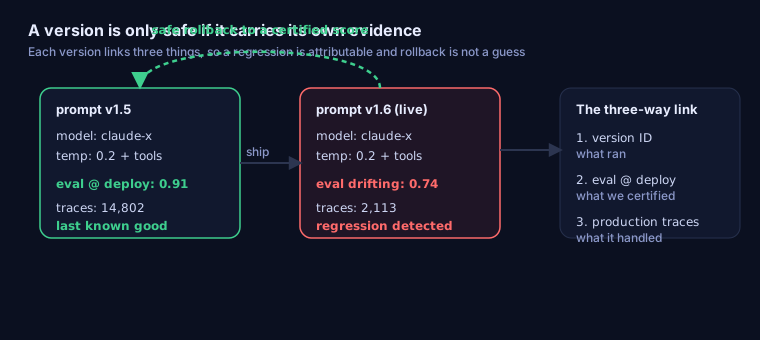
Each version has to carry three things: the version ID of what ran (prompt plus model plus parameters), the eval score certified at deploy time, and the production traces it handled. With all three, a regression is attributable and a rollback returns you to a known quality level. Without them, your version history is a git log, and rollback is a guess. This is the line with prompt optimization: optimization measures whether a change is better before you ship; versioning maintains the evidence after you ship. This page is about the second job.
What Silent Regressions Does Prompt Versioning Have to Catch?
The reason naive storage-based versioning fails is that the worst regressions arrive with no change event at all. There is no commit, no CI run, no alert. Several vectors cause behavior to shift while the prompt text in your repo looks untouched:
- A dashboard edit outside version control. Someone tweaks the live system prompt in a UI. No pull request, no version bump, no record.
- A model provider checkpoint update. The provider ships a new build of the same model name. Outputs move; your version ID does not.
- Parameter or tool-config drift. Temperature, top-p, or a tool’s schema changes without being versioned alongside the prompt text.
- Accumulated micro-edits. A few words added over weeks. Each looked harmless; together they broke a behavior. Deepchecks uses the example of softening “output strictly valid JSON” to looser wording to illustrate how structured-output error rates can spike, the same pattern practitioners report in production.
The corpus has the blunt version of this:
“Version control your prompts like code. One word change broke our entire system.” — r/PromptEngineering
Regression and reproducibility complaints like this recur as one of the more common categories across Mutagent’s community-research corpus of 7,797 developer pain quotes, and they share a shape: the change that broke production was real, but it was invisible to a system that only stores text. The only way to catch a regression with no change event is to keep measuring live outputs against the eval baseline tied to the last known-good version, so a drift from that score is the signal.
What Does a Complete Version Record Contain?
This is the “do not just store the text” section. Whether you keep versions in git or a dedicated prompt registry, a record that supports attribution and safe rollback carries more than a prompt string:
| Field | Example value | Why it matters |
|---|---|---|
| Immutable version ID | sha256:a3f9c1... or v1.6.0 | Identifies exactly what ran; never edited in place |
| Full execution context | model: claude-x, temp: 0.2, tools: [search] | Prompt text plus model, parameters, and tool config, because all of them change behavior |
| Author, timestamp, rationale | bene, 2026-06-20, "tighten refusal wording" | The “why,” not just a diff, so a change can be reasoned about later |
| Template and variables | system.md + {locale}, {account_tier} | The structure that assembles the runtime prompt, not one rendered string |
| Eval score at promotion | 0.91 task-completion on a 50-case set | The quality certified before this version went live, the thing that makes rollback meaningful |
| Environment pointer | production | Which environment this version is active in right now |
The eval score at promotion is the field that separates an archive from a safety net. It is also the field every storage-first approach omits. Capture it as part of the eval-driven workflow that gates a version into production.
Should You Store Prompts in Git or a Prompt Registry?
Git gives you history, diffs, and review for free, and for a small team with prompts that change with the code, it is a fine start. It falls short on three things that matter at production scale, which is what dedicated prompt management tools, built around a prompt registry, add.
| Capability | Git alone | Prompt registry |
|---|---|---|
| History, diffs, review | Yes | Yes |
| Fetch a prompt at runtime without a redeploy | No | Yes |
| Editing by non-engineers (product, domain experts) | No | Yes |
| Eval score attached to a version | No | Yes |
| Production traces linked to a version | No | Yes |
The deciding factor is the bottom two rows. A prompt registry that only stores text is also incomplete; whichever layer you pick, the record has to carry the eval score certified at promotion and references to the traces a version ran, or it cannot answer the regression question.
How Do You Roll Back a Prompt Safely?
Every guide says rollback is reassigning the production label to the previous version. That is the mechanism, not the safety. Safe rollback answers a harder question: roll back to what, and how do you know it is good?
A safe rollback protocol:
- Identify the last version that passed its eval gate above your quality threshold at the time it was promoted.
- Check that version’s trace history for issues it had when it was previously live.
- Repoint the production label to it. This is instant and needs no redeploy.
- Confirm that live eval scores on current traffic return to that version’s certified baseline within a set number of requests.
- Add the failing cases from the regressed version to your eval set so the same regression cannot ship again undetected.
The anti-pattern is rolling back to a version whose eval score you never recorded, which is the usual outcome when git is the only versioning layer. You restore the text and hope, and you find out whether the version you reverted to was any good only after it is live again.
How Do You Tie Every Trace to Its Prompt Version?
Attribution is only real if every production inference records the version that produced it. Stamp the version ID onto each LLM call as a span attribute in the trace, and three things become possible.
You can pull every trace from a suspect version when a quality drop appears. You can run the same scorers used at promotion against live traffic grouped by version, so a divergence from the certified baseline is attributable to a specific version and time. And you can tell apart the three causes that look identical from the outside: a prompt text change shows as a new version ID; a silent provider update shows as the same version ID drifting below its baseline; an input shift shows as scores holding on a synthetic set but dropping on real traffic. Continuous comparison against the baseline is the monitoring job that makes the whole chain work.
How Does Prompt Versioning Work in Multi-Step Agents?
Agents raise the stakes, because they run many prompts in sequence and the prompts depend on each other. Version each step’s prompt independently with its own ID, and stamp every step’s version into the agent-level trace. Then when a multi-step agent degrades, you can see which step’s version changed or drifted rather than guessing across the whole chain.
Take a three-step retrieval agent: a query-rewrite step, a retrieval step, and an answer step, each driven by its own prompt. If answer quality drops, an unversioned agent leaves you bisecting the whole pipeline by hand. With each step versioned and stamped into the trace, you can see that the rewrite step moved from v2 to v3 last Tuesday while the other two held, and that the regression started the same day. The failure localizes to one step before you read a single output.
Two consequences follow. Rollback may be coordinated: fixing a regression can mean reverting more than one step’s version together. And the eval that matters is end to end, not just per step, because a chain can degrade even when each step’s individual score holds. Versioning the steps separately is what lets you localize the failure; evaluating the chain as a whole is what tells you the failure happened.
Next Steps: Versioning as the Evidence Chain
Storing prompt versions is easy. Making them carry their own evidence, the eval score they earned and the traces they ran, is what turns version history into a regression-attribution system you can roll back through safely. That evidence chain is what stands between a confident rollback and a hopeful one.
Mutagent’s autonomous AI Engineer keeps that chain intact across your agent’s lifecycle: it ties each prompt version to its eval baseline and the traces it produced, watches live scores for a drift from that baseline, and surfaces the version at the root of a regression with a safe rollback target already identified. Meet the autonomous AI Engineer to see versioning, evaluation, and monitoring work as one loop.
Frequently Asked Questions
What is prompt versioning?
Prompt versioning is the practice of treating every change to a prompt as an immutable, identifiable artifact: a version ID, the full execution context (prompt text, model, parameters, and tool config), the author, the timestamp, and the reason for the change. It lets you say exactly which version ran on a given request and reproduce it. It is more than storing text in git, because a useful version record also carries the eval score the version earned before it shipped and links to the production traces it handled, which is what makes a regression attributable and a rollback safe.
What is the difference between prompt versioning and prompt optimization?
Prompt optimization answers whether a change is better, by measuring a candidate prompt against evals before you ship it. Prompt versioning answers which version ran on a given trace and whether it was safe when you shipped it, by maintaining the evidence chain after you ship. Optimization is about improving; versioning is about attribution and recovery. They work together: optimization certifies a version's eval score, and versioning records that score against the version so that, months later, a regression can be traced to a specific change and rolled back to a version with a known quality level.
Why do AI agents regress without any code change?
Because several things that control behavior can change with no deploy. Someone edits a system prompt in a dashboard outside version control. A model provider ships a checkpoint update that shifts outputs without a version bump or notice. A temperature, top-p, or tool-schema value drifts. Small wording edits accumulate until a behavior silently breaks. None of these trigger a CI run or an alert, so the only way to catch them is to tie each prompt version to an eval baseline and keep measuring live outputs against it, so a drift from the certified score is visible.
How do you roll back a prompt safely?
Rolling back is more than reassigning the production label to the previous version. Safe rollback means returning to a version whose eval score was certified at the time it was live, so you know the quality level you are restoring rather than guessing. The protocol: identify the last version that passed its eval gate above threshold, check its trace history for known issues, repoint the production label to it, confirm live eval scores return to that baseline, and add the failing cases from the regressed version to your eval set so the regression cannot recur undetected.
Should you store prompts in git or a prompt registry?
Git gives you history, diffs, and review, but on its own it cannot fetch a prompt at runtime, exclude non-engineers, and most importantly it does not attach an eval score or production traces to a version. A prompt registry adds runtime fetch, environment labels, and non-engineer editing. Whichever you choose, the missing piece in a text-only approach is the same: the version record must carry the eval result certified at promotion and references to the traces the version ran, or it is an archive rather than a safety net.