Coding Agents: What They're Good At, and Where They Break
Coding agents plan, write, run, and fix code on their own. Learn what they are good at, why they fail, and how to make a coding agent reliable in production.
Coding agents are AI systems that take a goal, plan the steps, write code, run it, read the result, and decide what to do next, looping until the task is done or they get stuck. That loop is the difference between an agent and an autocomplete assistant: the assistant finishes your line, the agent runs the whole task. It is the most mature agent use case in production today, and also the one where the gap between a good demo and a reliable system is widest.
This page covers what coding agents actually are, where they genuinely deliver, and the part most guides skip: where they break, and what it takes to make one reliable.
What Is a Coding Agent?
A coding agent runs a “reason and act” loop. Given a goal, it breaks the request into steps, uses tools (read and write files, run shell commands, call tests, use version control), observes what happened, and adjusts. When it hits an error, it reads the message, reasons about the cause, and tries again, all without you driving each step.
What separates a coding agent from a coding assistant is the loop. Both run on the same kind of large language model; what changes is who drives. The assistant proposes and you accept or reject each suggestion. The agent acts, checks its own work, and iterates.
| Coding assistant | Coding agent | |
|---|---|---|
| Unit of work | Next line or block | A whole task |
| Control | You drive every step | Agent drives, you set the goal |
| Feedback | You read the suggestion | Agent runs code and reads results |
| Failure mode | A bad suggestion you ignore | A loop you have to notice and stop |
| Example | Inline autocomplete | Claude Code, Cursor, Devin, Codex |
The current generation, Claude Code, Cursor, Codex, Copilot agent mode, Devin, and others, can handle entire features, run tests, and work across a codebase while you do something else. The capability is real. So is the failure surface that comes with handing over the loop.
What Coding Agents Are Actually Good At
Coding agents deliver most reliably on bounded work where success is easy to verify. The pattern that matters: the task has a clear pass/fail signal the agent can check itself, which is exactly what its run-and-observe loop needs.
- Boilerplate and scaffolding: new endpoints, CRUD, config, and test setup. High volume, low ambiguity.
- Mechanical refactors: renames, signature changes, extracting functions across many files where a human would just be doing find-and-replace with judgment.
- Migrations: upgrading a library or framework across a codebase, where the change is repetitive but spans too many files to do by hand.
- Writing tests: generating coverage against existing behavior, where the code under test is the spec.
- First-pass debugging: taking a stack trace and proposing a fix, which a human then verifies.
What these share: a verifiable success criterion. Where that criterion gets fuzzy, novel architecture, vague requirements, business-logic judgment, the agent’s self-check breaks down and the reliability drops fast.
Where Coding Agents Break
Here is the part the “what is a coding agent” guides and the “best coding agents” listicles mostly skip. They define the tools and rank them; they rarely tell you what the day-2 experience is actually like. Across the coding-agent complaints in Mutagent’s community-research corpus (mostly Reddit and Hacker News, where a single complaint can fall in more than one cluster), three failure modes dominate.
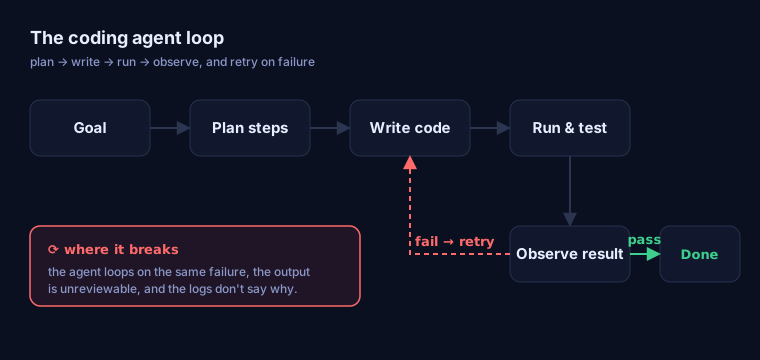
1. The agent loops on the same failure. The single most common pattern, at 49% of the complaints, is the agent getting stuck retrying the same broken approach. It writes code, the test fails, it “fixes” it, the test fails the same way, and it goes again. One practitioner described a run that “ran in a loop but got stuck… it started failing at being able to do so, and couldn’t proceed further. there is too much code now for me to manually edit.” The loop that makes the agent powerful is the same loop that traps it when its feedback signal is wrong.
2. The output is unreviewable. The next-largest cluster, at 24% of the complaints, is the review burden of AI-generated code: the agent produces a large, plausible-looking diff that passes a glance but hides subtle errors, and reviewing it carefully costs as much as writing it would have. At volume this compounds, the more the agent writes, the more there is to review, and the less any one diff gets scrutinized.
3. Debugging blindness. The third cluster, at 31% of the complaints, is the absence of insight into the agent’s own decisions. As one developer put it: “the logs are walls of text. cursor helps me write the code but doesn’t help me understand why the agent picks one path vs another.” When the agent goes wrong, the logs tell you what it did, not why, so you cannot correct the decision, only re-prompt and hope.
The three failure modes share one root: a coding agent runs an autonomous loop but gives you almost no observability into it. This is the same debugging blindness that drives LLM tracing for every other kind of agent, surfacing in your editor rather than a production trace.
How Do You Make a Coding Agent Reliable?
Reliability does not come from a better model or a better prompt. It comes from the system around the agent: the evals, traces, and review gates that turn a loop you cannot see into one you can steer. The same Monitor, Diagnose, Optimize loop that governs production agents applies to coding agents:
- Make the success criterion real. The agent’s loop is only as good as the test it checks against. A missing or wrong test is what most repeated-failure loops are actually optimizing toward. Strong, specific evals are the steering wheel.
- Trace the run, don’t re-prompt. When an agent fails, the answer is in the sequence of steps it took, which file it edited, which command it ran, where the output diverged, not in the wall of logs. Tracing turns “it keeps failing” into “it regressed at step 4 because the context dropped the schema.”
- Gate the output. Keep a human review checkpoint sized to the risk, and never let an agent’s self-report (“done, tests pass”) be the only signal. The agent cannot see the subtle errors it makes; the gate is where they get caught.
This is exactly the gap Mutagent’s autonomous AI Engineer closes for production agents: it traces a failing run, finds the step at the root of the regression, and proposes a validated fix, instead of leaving you to re-prompt blind.
How Do You Choose a Coding Agent?
Rankings of the “best” coding agent go stale in weeks, and the right answer depends on your codebase, not a leaderboard. The criteria that actually predict whether an agent will work for you:
- Codebase context: can it hold and retrieve the relevant parts of your repo, not a toy project?
- Verifiability: how easily can you wire your real tests into its loop as the success signal?
- Observability: when it fails, can you see the steps it took, or just a wall of output?
- Review surface: does it produce reviewable, scoped diffs, or large opaque ones?
- Control: can you set guardrails (which files, which commands, when to stop)?
Notice that three of those five are about what happens when the agent fails, not how impressive the demo is. That is the part that determines whether a coding agent saves time or quietly costs it.
Next Steps
Coding agents are the clearest proof that agents can do real work, and the clearest reminder that capability without observability is a liability. The teams getting value from them are not the ones with the best model; they are the ones who treat the agent’s loop as something to evaluate, trace, and steer.
That is the discipline Mutagent’s autonomous AI Engineer brings to every agent in your stack, coding or production. Meet the autonomous AI Engineer, or keep exploring AI agent use cases.
Frequently Asked Questions
What is the difference between a coding agent and a coding assistant?
A coding assistant suggests the next line or block while you stay in control of every step, like autocomplete. A coding agent takes a goal, plans the steps, writes the code, runs it, reads the result, and decides what to do next on its own. The assistant completes your keystroke; the agent runs a loop until it thinks the task is done.
Are AI coding agents reliable enough for production?
For scoped, verifiable tasks with good tests and human review, yes, and teams ship agent-written code daily. For novel architecture, vague requirements, or changes whose correctness is hard to test, agents are still unreliable: they can loop on the same failure, produce code that passes review but is subtly wrong, and give no signal about why they chose one path. Reliability comes from the system around the agent, the evals, tracing, and review gates, not from the model alone.
Why does my coding agent keep failing the same way?
Most repeated-failure loops come from the agent lacking the feedback it needs to correct course: the test it is optimizing against is wrong or missing, the error it sees is downstream of the real cause, or its context window has dropped the part of the codebase that matters. Without a trace of what the agent actually did at each step, it retries the same wrong fix. The fix is to trace the run, find the step that regressed, and correct the eval or context, not to re-prompt and hope.
What are coding agents best at?
Bounded, well-specified work where success is easy to verify: boilerplate and scaffolding, mechanical refactors, writing tests, dependency and framework migrations across many files, and first-pass debugging from a stack trace. These tasks have clear success criteria the agent can check itself, which is exactly what its run-and-observe loop needs.
Do coding agents replace developers?
No. Coding agents shift the developer's job from writing every line to specifying tasks, reviewing output, and debugging the agent when it goes wrong. The bottleneck moves from typing speed to judgment: deciding what to build, verifying that what the agent built is correct, and diagnosing failures the agent cannot see itself.